PotsLog

POTS · Dysautonomia · Orthostatic intolerance

The record your doctor asks for.

PotsLog records what actually happens to your heart rate when you stand up, what you felt that day, and what you took — and turns it into the summary your clinician asks for.

  • No account
  • No server
  • No ads
  • Free to log, forever
Coming soon to Google Play See how it works
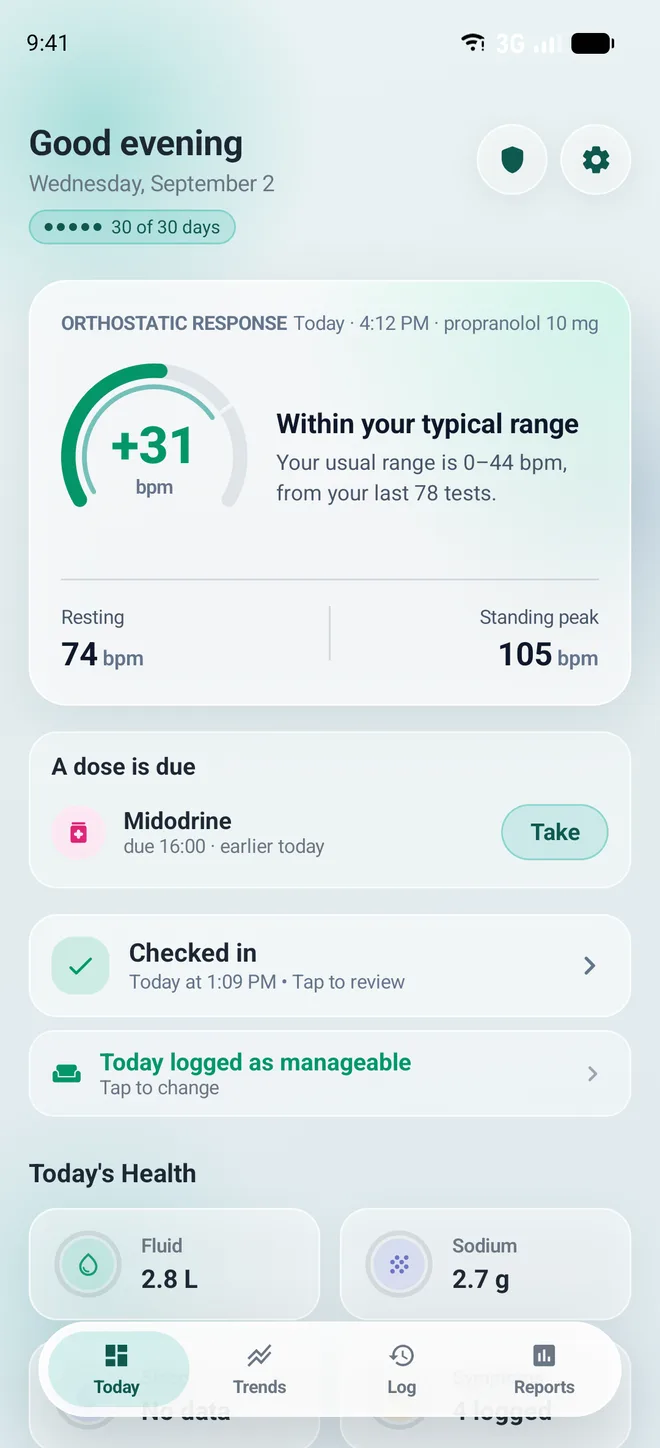
The PotsLog Today screen: an orthostatic response card reading plus 31 bpm, described as within your typical range, with resting 74 bpm and standing peak 105 bpm below it, then a dose due and today's fluid and sodium totals.

It measures, rather than asks

A timed standing test with the resting and standing figures kept apart, the way a clinician reads them — not a slider where you guess how bad today was.

It compares you to you

Every chart is shaded with the range your own readings usually sit in. There is no population normal in this app to fall short of.

It never grades you

No streaks, no scores, no missed-day counters. Bad days are the ones most worth recording, and the app is built so they can be.

A guided standing test

Five minutes down, ten minutes up — timed for you.

The home measurement behind the lean test and the poor man’s tilt table, with the resting and standing figures kept apart the way a clinician reads them.

  • No watch? The app asks for the count — and tells you how to take your own pulse before you stand, not while you are dizzy.
  • Wearing one? Read the figure off your watch and enter it. The app never asks your phone for your heart rate, so there is nothing to connect and nothing to grant.
  • A short eight-minute check when a full test is too much. It is marked as one, and never quietly folded into your usual range.
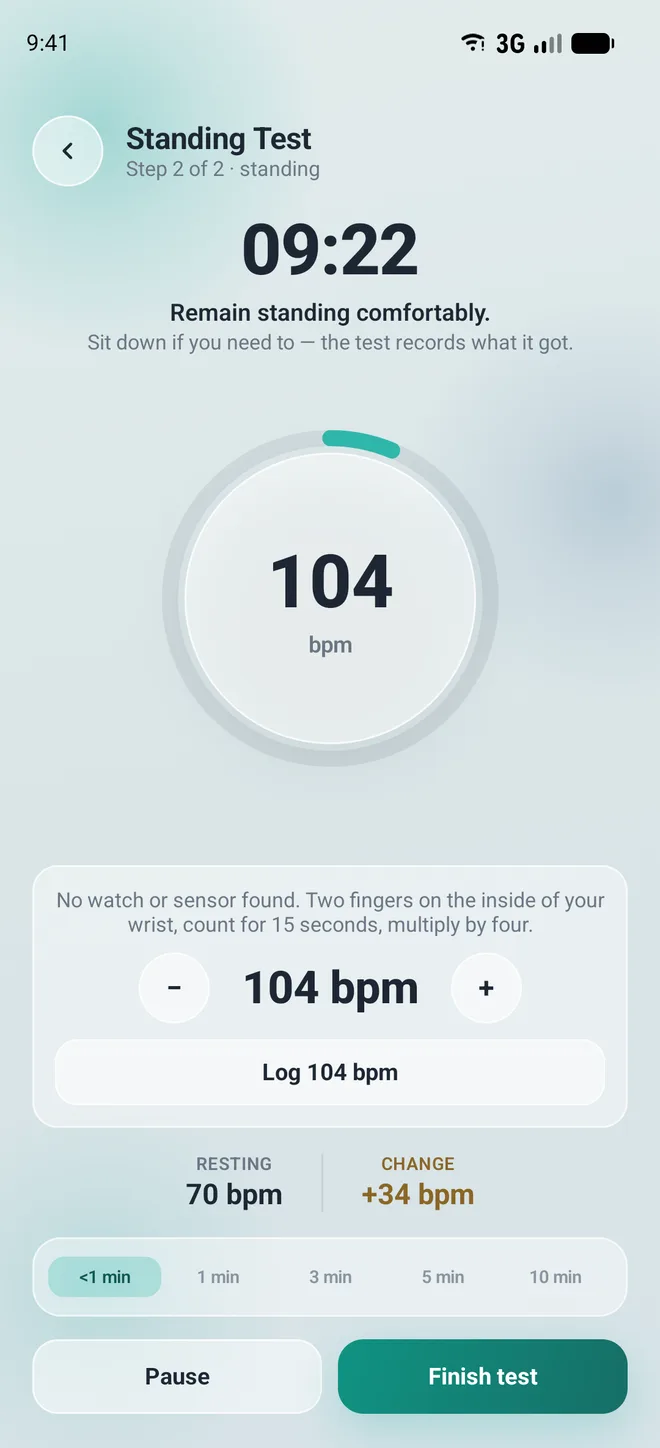
A standing test in progress, showing the upright phase counting down with a heart rate of 105 bpm and a change of plus 34 bpm from resting.

A report you can hand over

Thirty, ninety or a hundred and eighty days, in one document.

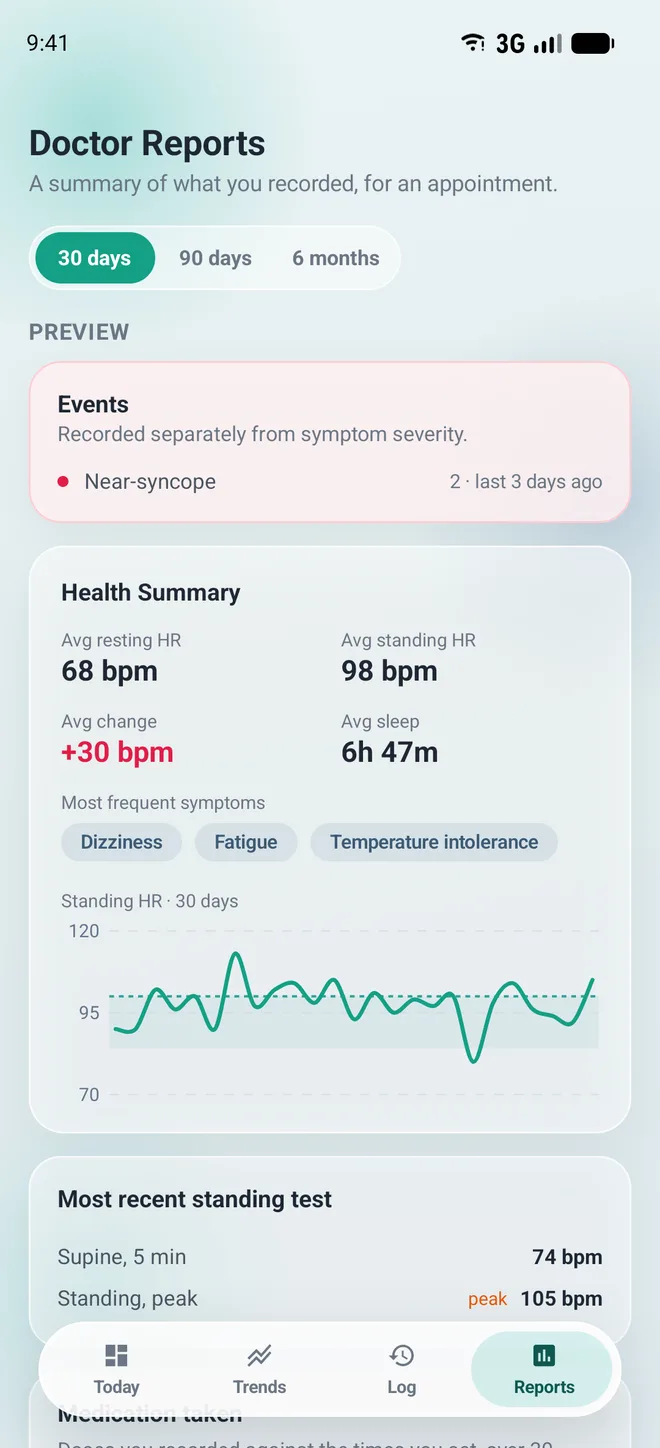
Average resting and standing rate, your orthostatic change, syncope and near-syncope counts, most frequent symptoms, sleep, and how many prescribed doses you actually took.

  • Export as PDF for the appointment, a spreadsheet for your own analysis, or a complete backup file you can read back in.
  • The first full report is free, and always will be.
The Doctor Reports screen with a 30-day preview: average resting heart rate 68 bpm, average standing 98 bpm, average change plus 30 bpm, average sleep 6 hours 47 minutes, most frequent symptoms, and the most recent standing test.

Trends over weeks, not days

Your standing tests as a line, against your own usual range.

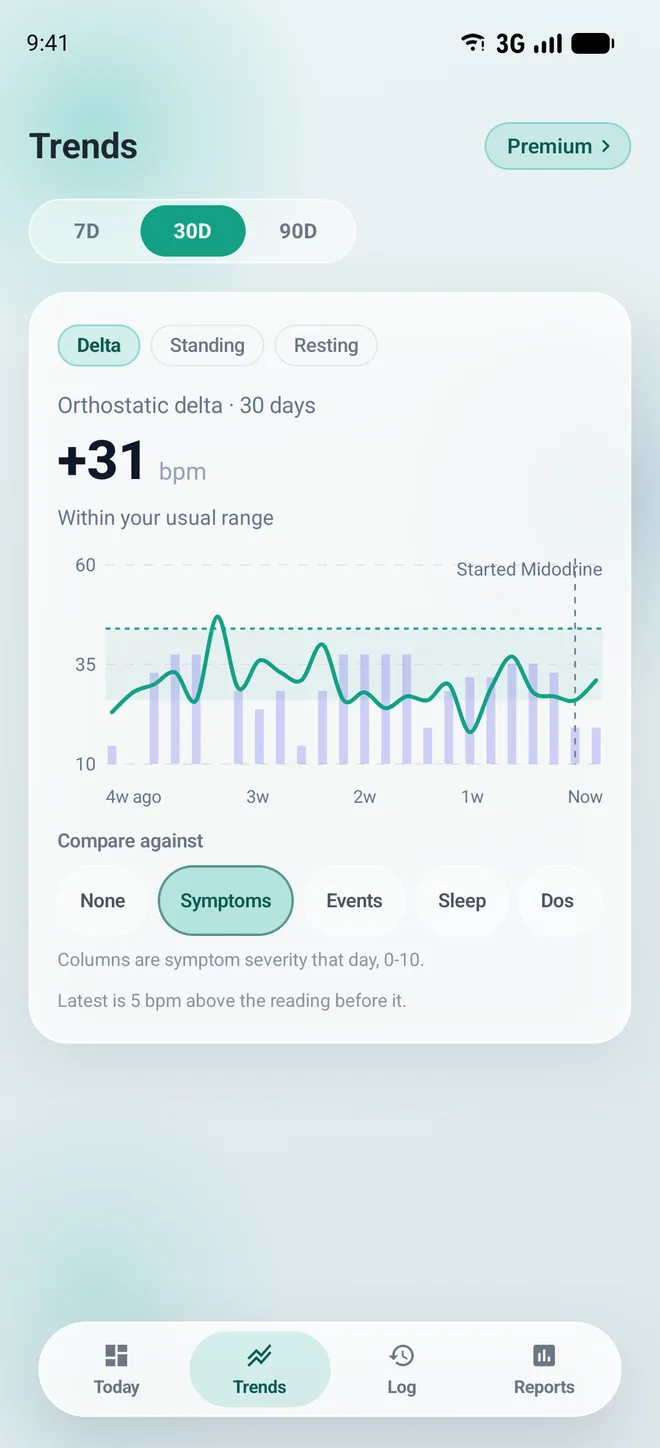
Seven, thirty or ninety days, shaded with the band your own readings sit in — never someone else’s normal.

  • Compare the line against symptoms, events, sleep or doses.
  • Medication changes are marked on the chart, so a step in the line has a date next to it.
The Trends screen over 30 days: orthostatic delta of plus 31 bpm within the usual range, a line chart with symptom severity columns overlaid and a marker where a medication was started.

Medication, fluid and salt

Doses against the times you set.

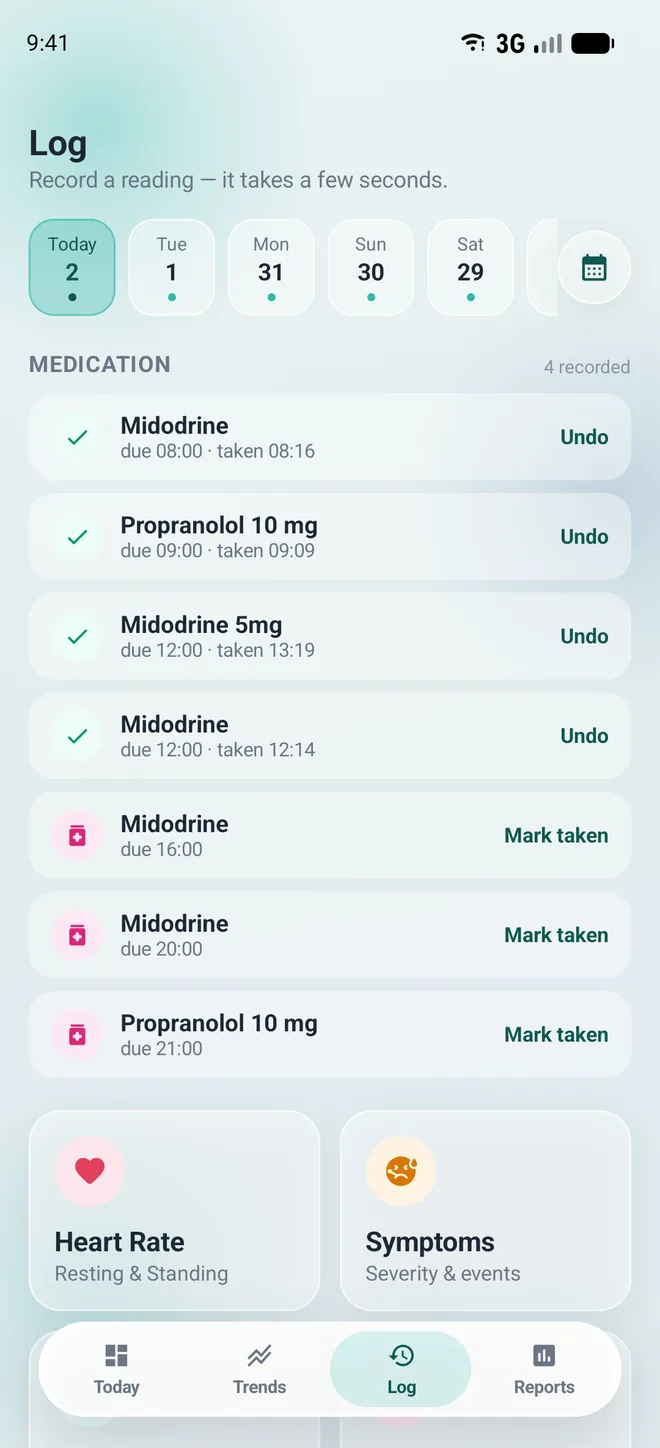
Reminders that can be silenced at night, and one tap to mark a dose taken — with ten minutes to undo it if you were wrong.

  • Fluid and sodium totals against your own targets. The app will never suggest a number or tell you that you are behind on one.
  • Blood pressure, heat, flares and cycle when you want them, hidden when you do not.
The Log screen listing today's medication: four doses marked taken with an undo option, and three still to be marked, above tiles for heart rate, symptoms, fluid and medication.

Home-screen widgets

Three of them, sized and configured by you.

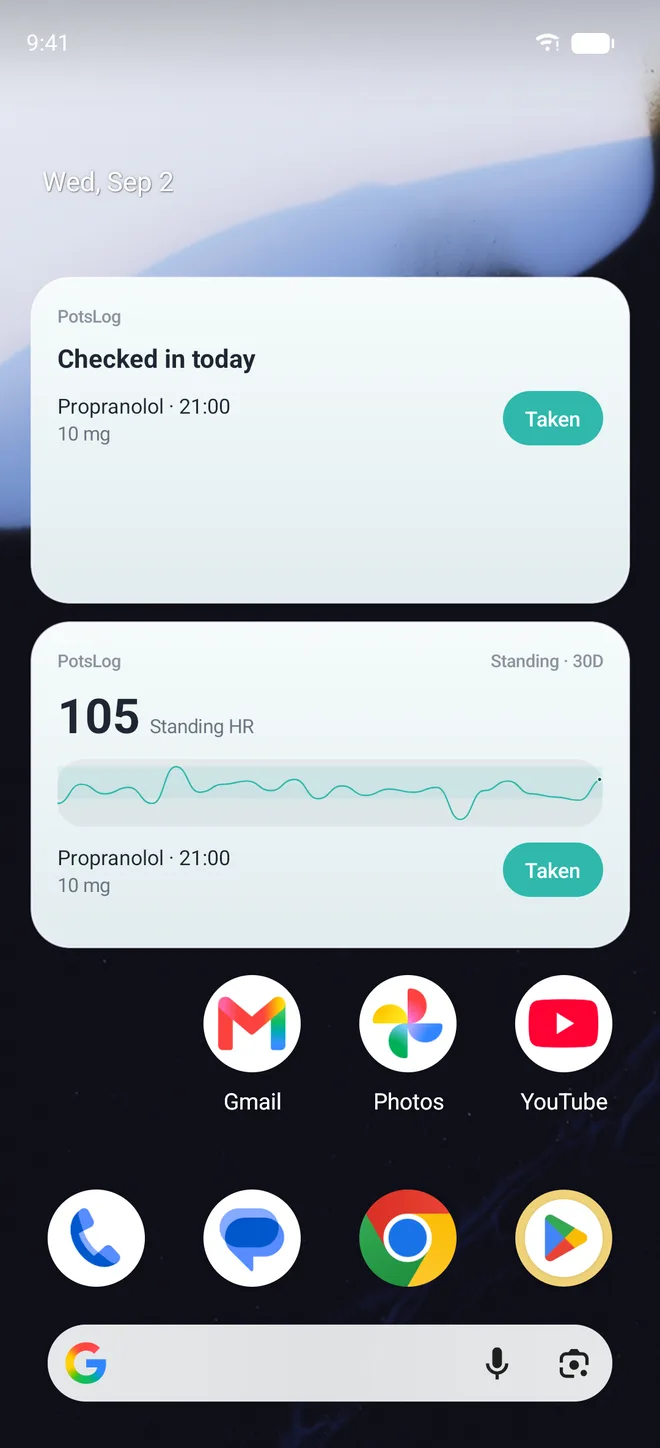
  • Whether today is recorded — the whole answer, at a glance.
  • Today’s doses, with one tap to mark each one.
  • A chart of the measurement you choose, over the window you choose.
An Android home screen with two PotsLog widgets: a check-in widget showing today recorded with a dose to take, and a trend widget showing 30 days of standing heart rate as a line.

For the days you cannot stand up

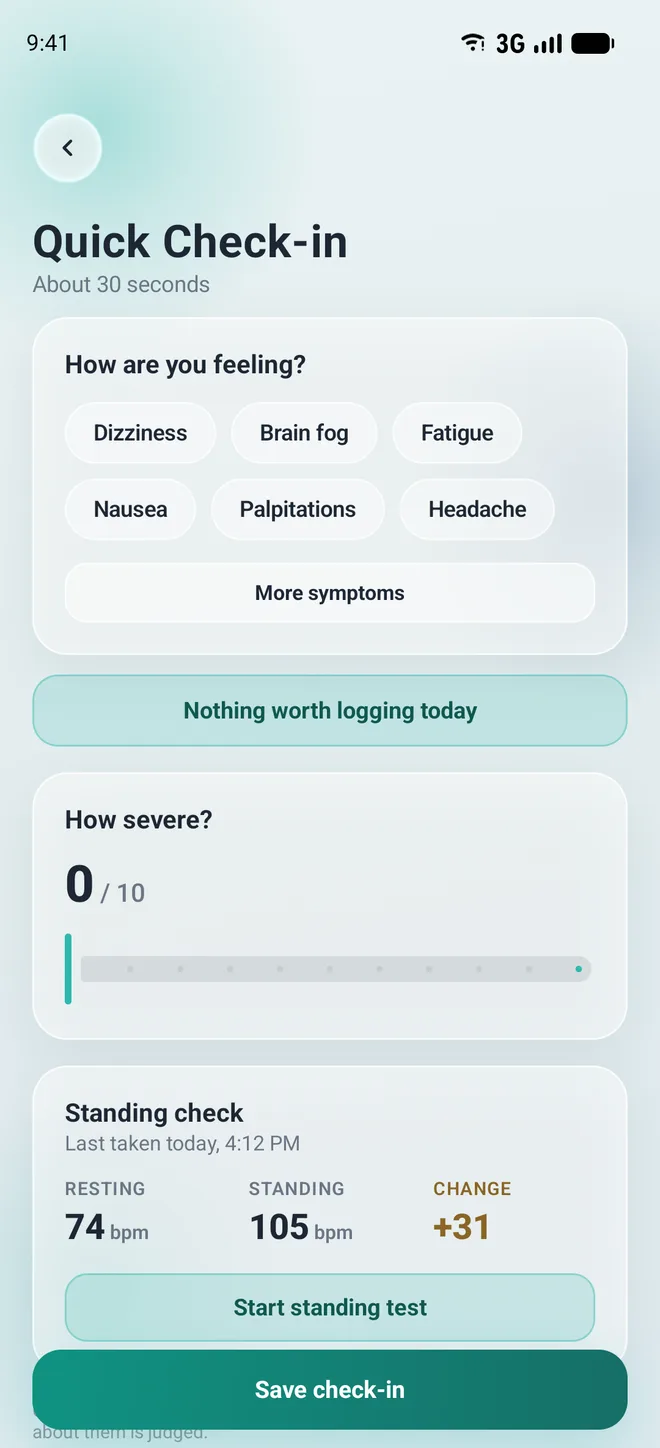
A thirty-second check-in, and a button that says nothing happened.

Symptoms, a severity, and done. No standing required, and one button for “nothing worth logging today”.

  • Nothing in this app counts your misses, grades your week or breaks a streak.
  • A gap in the record is information too, and it is never scolded.
The Quick Check-in screen: symptom chips for dizziness, brain fog, fatigue, nausea, palpitations and headache, a severity slider, and a button reading nothing worth logging today.

Private by design

No account. No server. No network call of any kind.

This audience has a specific and well-earned fear: that a health app will one day monetise the record it was trusted with. The only useful answer is an app that has nothing to monetise.

It stays on your phone

Entries, standing tests, medications and reports are stored on the device you typed them into.

There is no account

You do not sign up, so there is no name, email address or profile to leak.

Never sold or shared

Not with advertisers, insurers or researchers. Not in aggregate. Not de-identified.

Yours to take or destroy

Export the whole record free on any plan. Delete it permanently, in one place, at any time.

Free, and what Plus adds

Recording is free. It always will be.

Plus buys the analysis, never the record. If a subscription lapses you keep everything you logged, and export never costs anything.

Free

$0 forever

  • Unlimited logging and check-ins
  • Guided standing tests
  • Your complete history
  • 7-day trends
  • The first full doctor report
  • Every export — PDF, spreadsheet, full backup
  • All three home-screen widgets
If you cannot afford it, ask.

Plus is then free. There is no form, no proof and no expiry — the button is on the plans screen, and you do not have to explain anything to anyone.

Questions

The ones worth answering.

Is the standing test the same as a tilt table test?
No. It is a home measurement, taken by you, without supervision. It is useful to your clinician as a record of what happens on ordinary days. It is not the clinical investigation and it cannot replace one.
Do I need a smartwatch?
No, and the app does not read one either. It asks you for the count — and shows you how to take your own pulse before you stand up, rather than while you are dizzy. If you do wear a watch, read the number off it and type it in. PotsLog asks your phone for no health data at all, which is why it needs no health permissions and has nothing to connect.
Will it tell me whether I have POTS?
No, and it will never imply it. PotsLog does not diagnose anything and is not a medical device. It records what you put into it and adds it up. No number it shows you means you do or do not have any condition.
What happens to my data if I stop paying?
Nothing. Your existing record is never put behind a paywall, access to something you already logged is never removed, and export is never limited. Plus stops adding the longer trend windows and unlimited reports; that is all it ever did.
Is my data backed up anywhere?
Not by us — we have no server. Your phone’s own backup may include PotsLog the way it includes your other apps, to your Google or Apple account, under your password, where we cannot reach it. You can exclude it in your phone’s backup settings, and you can export a full backup file yourself at any time.
Is the app discreet on my home screen?
That was the point of the name. The launcher label reads “PotsLog”, a coined product name, rather than printing the name of a diagnosis for anyone who glances at your phone.
Is there an iPhone version?
The app is built on Kotlin Multiplatform with iOS in mind, but only the Android release is being prepared today. There is no iOS date to give you, and we would rather say that than promise one.
PotsLog is not a medical device.

It does not diagnose, treat or manage any condition, and it will never tell you to seek care or decide that for you. If you are worried about a symptom, an event or a reading, speak to your clinician or your local emergency service. Read the full disclaimer.